
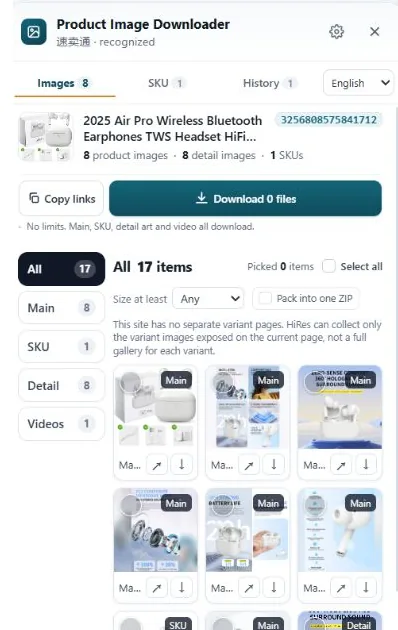
There is no single best tool here. There are five workflows, and the right one depends on whether you need variant labels or just files, how many marketplaces you work across, and whether you want to install anything. Below: what each option does well, where it falls short, and who it fits.
What to compare before you compare tools
Star ratings won't tell you whether a tool keeps the red variant's photos separate from the blue one's. These five things will:
- Coverage. Eight marketplaces, one marketplace, or any page at all?
- Grouping and labels. Product images come in main, variant and detail groups. A tool that dumps 60 files into one folder leaves the sorting to you.
- How you start. An extension works on the page you're already browsing. A web tool wants you to copy the link, paste it, and wait.
- Price model. Free, subscription, or one payment and done?
- Privacy. Does the page get processed in your browser, or on a server you don't control?
Option 1: no tool at all
You already own the manual method: open the zoom view, edit the size code out of the image URL, save the file. For one or two photos it's fine, and it costs nothing. The bill arrives in time. Each variant hides its own photo set behind a click, detail images live in a separate stack further down the page, and an hour later you have a folder of files named things like 71abcXYZ.jpg with no record of which color each one was. Fine for a single hero shot. Miserable for a catalogue.
Option 2: a generic image downloader extension
Search the Chrome Web Store for "image downloader" and you'll find dozens. They do exactly what the name says: list every image on the current page and let you save some or all of them. The catch is "every image". Logos, icons, banners, spacer pixels and the seller's photos all arrive in one undifferentiated list. There's no main, variant and detail structure, because the tool doesn't know what a variant is. If you grab pictures from all kinds of websites and rarely need product structure, that's a fair trade. For listing research, it means sorting by hand, every time.
Option 3: ExtractPics, the paste-a-link route
ExtractPics is a website, not an install. You paste a product URL, it renders the page in a real browser on its side, and you get the images back as a ZIP. Nothing to add to Chrome, which makes it handy on a borrowed or locked-down work machine, and it works on many kinds of stores, including Shopify stores that marketplace tools skip. The trade-offs are built into the workflow: you leave the page you're on, the fetch happens on their servers rather than in your logged-in session, and what comes back is the page's images rather than a labelled product structure. For a one-off page someone sent you, that's often all you need.
Option 4: DownPictures, for batch work across more platforms
DownPictures pairs a Chrome extension with a desktop client and covers a long list of marketplaces: Amazon, AliExpress, JD, SHEIN and more. It's built for batch work, pulling images from many listings rather than studying one. If your sourcing runs through platforms a marketplace panel like ours doesn't cover, JD and SHEIN being the obvious examples, this is the shape of tool to look at. The desktop client is one more thing to install and keep updated, so it earns its place only if the volume justifies it.
Option 5: AliSave, if AliExpress is your whole world
AliSave, part of the AliHelp family, does one thing: AliExpress. It reports over 100,000 users, and that focus shows in how it handles AliExpress pages specifically. If you source exclusively from AliExpress, a specialist is a sensible pick, and this is the established one. The limit is in the name. The day your research moves to Amazon, eBay or TikTok Shop, you're installing a second tool.
Option 6: HiRes, the in-page panel
Full disclosure, this is our tool. HiRes is a Chrome extension that sits on the product page you're already viewing, on Amazon, AliExpress, eBay, TikTok Shop, Temu, Etsy, Lazada and Walmart. Open the panel and the listing's images are grouped: main gallery, variant images with their option labels where the page provides them, and detail images, plus product video where the page exposes one. Individual downloads are free with no account and no daily cap. Pro is $19 once, not a subscription, and adds ZIP packaging, video downloads, resizing and longer history. Everything runs locally in your browser. Our limits, plainly: Chrome only, those eight marketplaces only, no Shopify store coverage, and the panel can only show what the page itself loads.
So which one fits you?
- You live on AliExpress: AliSave.
- Someone sent you one link and you can't install anything: ExtractPics.
- You batch across JD, SHEIN and other platforms: DownPictures.
- You grab images from random websites and structure doesn't matter: a generic downloader.
- You research products across the big marketplaces and need to know which photo belongs to which option: HiRes.
Plenty of sellers keep two of these around. The mistake is expecting one tool to be best at jobs it was never shaped for.
Questions people ask
What's the difference between a product image downloader and a normal image downloader?
A normal image downloader saves the images on a page, all of them, in one list. A product image downloader understands listing structure: it separates main gallery photos from variant images and detail images, and keeps the option label attached to each variant photo so you know which color or size it belongs to.
Do web-based downloaders work as well as extensions?
For a single public page, often yes. You paste the link and get a ZIP back. Where they struggle is pages that need your login, your region or your scroll history to show everything, because the page is fetched on the service's side, not in your browser session. Extensions see the page exactly as you do.
Are these tools free?
Most have some free use. HiRes is free for individual downloads with no account and no daily limit, and charges $19 once for extras like ZIP packaging and video downloads. For the others, check the pricing on their own sites; models change, and we won't quote numbers we can't verify.
Try the panel approach
HiRes groups a listing's main, variant and detail images right on the product page, labels attached. Free for individual downloads, no account needed.
Get HiRes for Chrome