
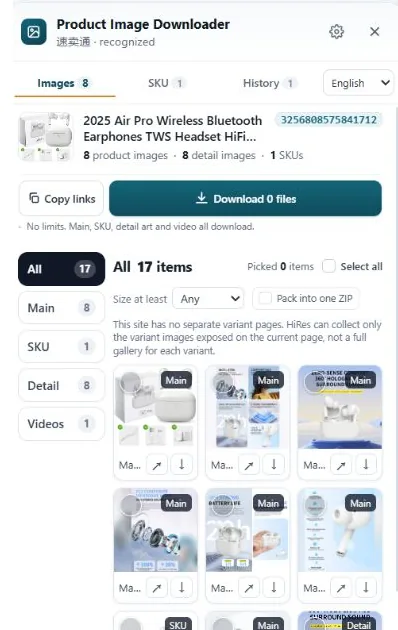
Right-clicking is fine for three photos and miserable for thirty listings. Generic image downloaders grab everything on the page, including the junk. Paste-a-URL tools work well one listing at a time. An in-page panel built for marketplaces keeps main, variant and detail images grouped and labeled, which is what decides whether a bulk download stays usable.
Method 1: right-click and save, one file at a time
The default method needs no tools, and for a single photo it is still the quickest. The problems show up at volume. A listing is not one image: it is a gallery of 6 to 9, a set per color variant, and a stack of detail images further down. Working through one listing properly takes around ten minutes of clicking swatches, opening zoom views and scrolling so lazy-loaded images appear.
There is also a size trap. The gallery usually displays a mid-size copy, often near 500px, and that is the file right-click saves. You can finish a long session with a folder full of thumbnails and not notice until you open one full-screen.
Verdict: fine for one or two reference shots. Not a bulk method, whatever you call it.
Method 2: generic all-image downloader extensions
These extensions scan the page and offer every image file they find in one list, with a download-all button. The speed is real. So is the mess. A product page references far more than product photos: the marketplace logo, payment badges, banner ads, star-rating sprites, review thumbnails, recommended-product tiles and tiny tracking images.
You also get no structure. The main gallery, the variant sets and the description stack arrive as one flat list of files with names like 71Kx3….jpg. Nothing says which photo belongs to the blue variant. And because the tool saves what the page references, you may still get the display copy instead of the full-size file the zoom viewer uses.
Verdict: good for grabbing every graphic off a simple web page. Poor fit for marketplace listings, where the structure is the valuable part.
Method 3: paste-a-URL web tools
Sites like ExtractPics take a different route: you paste the product URL, the service loads the page in its own browser, and you get the images back, usually as a ZIP. No install, and it works on many store types. For a one-off listing you do not want to install anything for, this is a reasonable choice.
The friction is repetition. Every listing is a copy, paste, wait, download cycle, and you are sending each URL to a third-party server. Pages that need your login or your region to show the full image set can also come back thinner than what you see in your own browser, because the service is viewing the page as a stranger.
Verdict: handy for the occasional listing. Slow going for a research session, and the returned files still arrive unlabeled.
Method 4: an in-page panel built for marketplaces
This is the category HiRes sits in. You open the product page yourself, in your region, logged in or not, and click the HiRes button in the corner. The panel lists what the page exposes, already grouped: main gallery, variant images with their option labels where the page provides them, and detail or description images separately. Product videos show up too where a listing exposes them.
For bulk work, the practical points are these. Individual files download free, on as many product pages as you like, with no account. Packaging a selection into one ZIP, expanded batch export, video downloads and resize or quality controls are part of Pro, which is $19 once, not a subscription. Everything runs locally in Chrome, so the images go from the marketplace straight to your Downloads folder.
The honest limit is the same one every tool has: HiRes can only save what the page loads for you. A listing behind a verification check shows any tool less. We would rather hand you a shorter list than pad it with page furniture.
The part nobody budgets for: the folder afterwards
Whichever method you pick, judge it by the folder it leaves behind. Marketplaces name files with random strings, so an unlabeled bulk download is a puzzle you set yourself. Two days later, nobody remembers which of the 300 files is the size chart for the second supplier, or which photos belong to the green variant.
That is why grouping and labels matter more than raw download speed. If the variant label and the image group survive the trip to your disk, the files stay usable. If they do not, bulk downloading just moves the work from clicking to sorting. Our companion guide covers a folder and naming system that holds up past 100 products.
A note on reusing images. Bulk saving for research, specs and supplier comparison is normal seller work. Publishing someone else's photos in a live listing is a different matter: the rights sit with the brand or photographer, and no download method changes that. See when supplier photos are safe to use.
Questions people ask
What is the fastest way to download all images from one product listing?
A tool that works inside the product page is usually fastest, because the page has already loaded the images and the tool can group them as main, variant and detail files. Paste-a-URL tools are close behind for a single listing but add a copy, paste and wait step for every page.
Do generic image downloaders get the full-size product photos?
Sometimes. They save whatever image files the page references, which includes the display copies the gallery is showing. On sites that serve a small copy in the gallery and a large one in the zoom view, a generic downloader often grabs the small one, along with logos, banners and review thumbnails you did not want.
Why do bulk downloads end up unusable?
Because the files arrive without context. Marketplaces name images with random strings, so a folder of 300 downloads tells you nothing about which product, color or section each file came from. The download takes two minutes; sorting it out later takes an evening. Grouping and labels at download time are what prevent that.
Is bulk downloading product images allowed?
Saving images to your own computer for research, specs and comparison is normal seller work. Publishing those images in your own listing is a separate question, because the rights belong to the brand or photographer. Bulk downloading does not change the rights situation either way.
Bulk download, minus the sorting evening
HiRes groups each listing's main, variant and detail images in one panel on the page you are already viewing. Free for individual downloads, no account needed.
Get HiRes for Chrome