
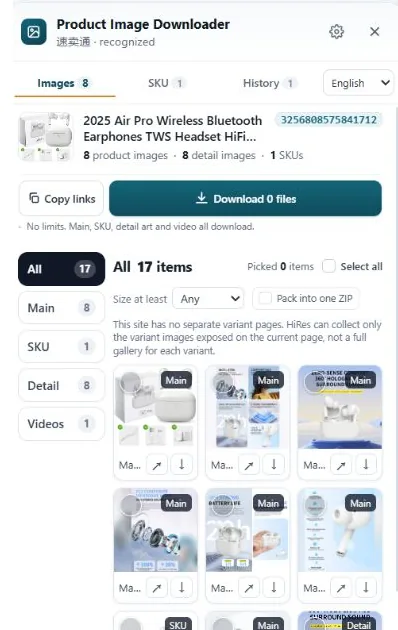
Amazon stores several sizes of every product photo. The gallery shows a small one; the zoom viewer loads the big one. You can reach the full-size file by opening the zoom view or by editing the size code out of the image URL. For a whole listing, gallery, variant and A+ images included, a downloader tool pulls them in one pass.
Why the saved image is so small
Every photo a seller uploads gets copied into a stack of sizes. The listing page loads a mid-size copy (fast, good enough on screen), product feeds get others, and the largest copy is kept for the zoom viewer. When you right-click the gallery image, your browser saves the copy it is currently displaying, which is usually around 500px on the long edge. It looks fine inside the page and falls apart the moment you open it full-screen or drop it into an editor.
The size is written into the image URL itself. Open a product image in a new tab and look at the file name: you will see a segment like _AC_SL1500_ or _AC_SX569_ before the extension. That segment is Amazon's sizing instruction. Change it, and Amazon serves a different size of the same photo.
Method 1: edit the size code in the URL
This is the quickest fix for a single image:
- On the product page, click the main image to open the enlarged view.
- Right-click the enlarged image and open it in a new tab.
- Look at the URL. Find the size segment between underscores, for example
._AC_SL1500_. - Either raise the number (1500 is already large; some listings go to 2000+) or delete the whole size segment so the URL ends like
.jpgwith nothing between the name and the extension. Deleting it usually returns the largest version Amazon holds. - Save the image from that tab.
One honest caveat: this can only give you what the seller uploaded. If the brand supplied a 1200px original, the "full size" is 1200px and no URL trick changes that. Plenty of older listings top out there.
Method 2: work through the gallery, swatches and A+ modules
A listing is not one photo. To collect everything manually you have to make the page show you everything:
- Gallery images. Click each thumbnail on the left, open the enlarged view, save the full-size version. Most listings carry 6 to 9 of these.
- Variant images. Click every color or style swatch. The gallery swaps to that variant's own photo set, and some of those photos never appear under the default variant.
- A+ content images. The brand modules further down the page (comparison charts, lifestyle banners, feature blocks) are separate image files, not part of the gallery. Right-clicking those usually gets you closer to full size, but they are easy to miss entirely.
For one listing, this is maybe ten minutes of clicking. For a research session of thirty listings, it is an afternoon, and you will still miss a variant set somewhere.
Doing it with HiRes instead
HiRes is a Chrome extension built for exactly this page. Open any Amazon product page, click the HiRes button in the corner, and the panel lists what the page exposes, already sorted: main gallery in one group, variant images with their option labels in another, detail and A+ images in a third. Tick what you need and save the files individually, or package a bigger selection as a ZIP (that part is in Pro, $19 once; individual downloads are free with no daily cap).
Two things worth knowing. First, everything runs locally in your browser; the images go from Amazon's servers straight to your Downloads folder, never through us. Second, HiRes can only save what the page actually loads. A listing that hides images behind a login prompt or a regional storefront gives any tool less to work with, and we would rather show you a shorter list than invent files that aren't there.
A note on reusing images. Pulling photos for research, spec checks and supplier comparison is normal seller work. Publishing someone else's photos in your own listing is a different matter: the rights sit with the brand or photographer. We wrote a separate guide on when supplier photos are safe to use and when they get listings removed.
Questions people ask
What is the largest size Amazon product images come in?
It depends on what the seller uploaded. Many listings top out at 1500 or 2000 pixels on the long edge, and some go higher. If the brand only uploaded a 1200px file, no tool can give you more than that. The file Amazon shows in the zoom viewer is normally the biggest version available.
Why does right-click save such a small image?
The gallery thumbnail you right-click is a display copy, often around 500px. Amazon generates several sizes of every photo and serves the small one for page speed. The full-size version sits at a similar URL with a different size code, or loads when you open the zoom viewer.
Can I use Amazon product images in my own store?
Downloading a photo and having the right to publish it are two different things. Brand and supplier photos belong to whoever created them. Sellers commonly download images for research, specs and comparison, but reusing them in a live listing without permission can get the listing taken down. Get permission or shoot your own for anything customer-facing.
Does this work on Amazon.de, Amazon.co.uk and other regions?
Yes. Every Amazon storefront uses the same image system and the same size codes in image URLs, so the methods here work the same way on .com, .de, .co.uk, .co.jp and the rest.
Skip the right-click routine
HiRes gathers the gallery, variant and detail images from the Amazon page you are already on, in one panel. Free for individual downloads, no account needed.
Get HiRes for Chrome