
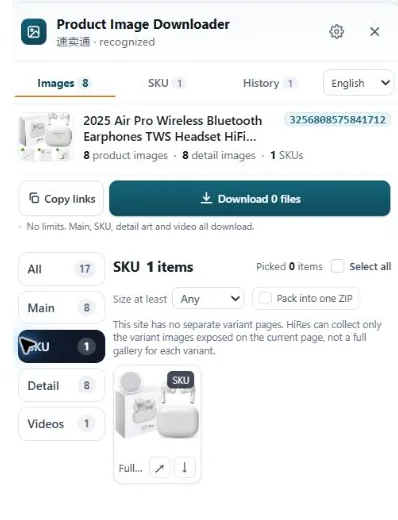
Main images: the gallery at the top
Main images are the photo set in the gallery at the top of the product page, the one shoppers flip through before reading a word. The first of them is the hero shot that shows up in search results. The rest are angles, close-ups, in-use shots and the occasional infographic the seller put in the gallery itself.
When people say "download the product images," this gallery is usually what they mean, and it's the easiest group to grab because it's front and center on the page.
Variant images: one set per option
Variant images (often called SKU images) belong to a specific purchasable option: this color, that size, this bundle. Click the blue swatch on a shirt listing and the gallery reloads with photos of the blue shirt. Those photos are variant images, and the important part is not the photo itself but the link between the photo and the option it belongs to.
This is where manual downloading falls apart. You can right-click your way through five colors and end up with forty files in a folder, and a week later nobody can say which three photos were the green one. The mapping was visible on the page and got lost the moment the files hit your disk.
Detail images: everything below the fold
Detail images live in the description area: the long vertical stack on AliExpress and Temu, the A+ modules on Amazon, the item description on eBay. Size charts, dimension diagrams, material close-ups, assembly steps, comparison tables, lifestyle banners. They rarely appear in the top gallery, they're often very tall files, and they carry most of the hard facts about the product, which makes them the group researchers actually need and the group most often forgotten.
What each marketplace calls them
| Marketplace | Main | Variant | Detail |
|---|---|---|---|
| Amazon | Gallery images | Swatch / variation images | A+ content modules |
| AliExpress | Product gallery | SKU images | Description images |
| eBay | Listing photos | Variation photos | Description images |
| TikTok Shop | Product carousel | SKU images | Description images |
| Temu | Gallery | Option images | Detail / description images |
| Etsy | Listing photos | Variation photos | Photos and description images |
Different names, same three jobs. Once you see a listing as three groups instead of one pile, you also start noticing what's missing: a listing with no variant images is guessing its colors, and one with no size chart in the detail set is asking for returns.
How HiRes keeps the three groups separate
Sorting photos by hand after downloading them is the part nobody does. HiRes sorts them at collection time instead: open a product page and the panel shows the main gallery, the variant images with their option labels where the page exposes them, and the detail images as separate groups. You download a group, or pick files across groups, and the variant labels stay attached to their images rather than evaporating.
The label point has a limit worth stating: a few marketplaces don't expose which option an image belongs to (Etsy is the common case). There, HiRes shows you the images it can identify and leaves the unlabeled ones unlabeled. A blank is more useful than a guess when you're rebuilding a listing from the files later.
Questions people ask
Is a variant image the same as another angle of the product?
No. Another angle of the same red shirt is a gallery image. A variant image shows a different purchasable option, like the blue version of that shirt, and it is attached to the blue option so the gallery changes when a shopper selects it.
Are detail images part of the main gallery?
Usually not. Detail images live in the description area or A+ modules below the gallery: size charts, dimension diagrams, material close-ups and lifestyle banners. They are separate files in a separate part of the page, which is why right-click collection so often misses them.
Why do variant images matter when researching a product?
Because they carry the option mapping. A loose pile of 40 downloaded photos doesn't tell you which photo belongs to which color. Keeping the variant label with each file means you can rebuild the listing structure later without opening every image by hand.
Collect all three groups at once
HiRes shows a listing's main, variant and detail images in one panel, labels attached. Free for individual downloads.
Get HiRes for Chrome