
One folder per product, named with the product and its ASIN or supplier SKU. Inside it, three subfolders: main, variant, detail. File names carry the variant label and the shot type. A one-line-per-product research log records the source URL and date. The system works because it mirrors how listings are built, and because labeled downloads cut the filing work to almost nothing.
Rule one: one folder per product, named for searching
Create the product folder before you download anything, not after. Name it so a file search finds it in six months: product first, identifier second. Something like silicone-baking-mat_B08XYZ1234 for an Amazon find, or the supplier's own SKU for an AliExpress one. Dates and vague names like "new product 3" are how collections rot.
Keep one parent folder for research, separate from the folder that holds your own listing photos. Mixing downloaded reference images with photos you own and can publish is a mistake you only make once, usually at the worst moment.
Rule two: three subfolders, matching the listing itself
Inside each product folder, make the same three subfolders every time:
- main for the gallery photos, in page order if you can manage it.
- variant for the per-option photos, one color or size per set.
- detail for description and A+ images: size charts, dimension diagrams, material close-ups.
Three is the right number. It matches how every marketplace structures a listing, so filing is a decision you make once per download batch, not once per file. Systems with eight categories and color tags look clever in a screenshot and get abandoned by Thursday.
Rule three: file names carry the label
Marketplaces name images with random strings, and those names are useless the second the file leaves the page. Rename on the way in, with a pattern you can read at a glance: group first, variant second, shot third. variant-blue-front.jpg, variant-blue-back.jpg, detail-size-chart.jpg. Thirty seconds of renaming per listing saves the open-every-file routine later.
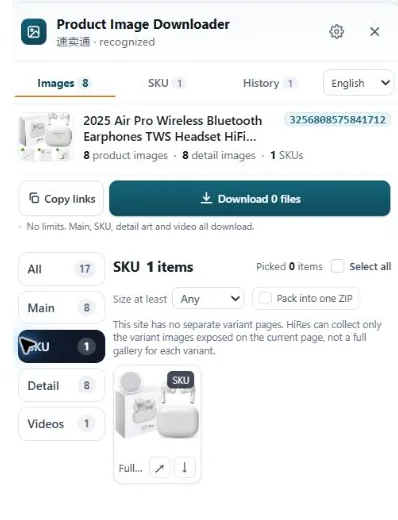
This is where the download method earns its keep. When a tool shows variant images with their option labels attached, as HiRes does where the page provides them, you know the label before the file lands and renaming is a formality. When the download arrives as one anonymous pile, the label is gone and no naming system can bring it back.
Rule four: keep a research log, one line per product
A plain text file or a basic spreadsheet is enough. For each product, record the source URL, the date you downloaded, the seller or supplier name, and anything you know about permission to use the images. It takes twenty seconds while the page is open in front of you.
That log pays off in boring situations that matter: a supplier claims you copied their photos, a brand asks where an image came from, or you return to a product three months later and need the original listing. Sellers who skip the log always plan to reconstruct it later. Nobody reconstructs it later.
What breaks at 100+ products, and the fix
The system holds until volume hits. Past a hundred products, three things go wrong. Duplicates creep in, because the same product gets researched twice under slightly different folder names; search by ASIN or SKU before creating a folder. Orphans pile up in Downloads, because filing gets postponed; a five-minute weekly sweep, move it or delete it, keeps the pile from forming. And the log drifts out of date, because it lives somewhere you never open; keep it in the research folder itself, not in a separate app.
None of this needs software. It needs the labels to survive the download, and two minutes of filing while the listing is still fresh in your head.
A note on why the log mentions rights. Downloaded photos belong to whoever created them, whatever your folders are called. Keeping research images separate from your own publishable photos, and noting any permission in the log, keeps an honest filing system from turning into an accidental infringement. More in our guide on when supplier photos are safe to use.
Questions people ask
What should I name product image files?
Start with the group, then the variant, then the shot: variant-blue-front.jpg or detail-size-chart.jpg tells you what a file is without opening it. Keep the marketplace's random file names for nothing. If a tool keeps the variant label attached to the image, half of this renaming is already done.
How many subfolders does one product need?
Three covers almost everything: main, variant and detail. That mirrors how listings are built, so a folder maps straight back to the page it came from. More levels than that and you will stop filing things properly within a week.
Should I keep a log of where images came from?
Yes, and it can be one plain text file or a simple spreadsheet. One line per product: source URL, date, supplier or seller name, and a note on rights or permission. When a listing is challenged or a supplier dispute comes up, that log is the difference between answering in a minute and digging for an hour.
What breaks first when the collection gets big?
Duplicates and orphans. The same product gets downloaded twice under two names, and files land in Downloads with no product attached to them. A weekly five-minute sweep of the Downloads folder, moving or deleting what is unfiled, stops the pile from forming.
Start with labeled downloads
HiRes shows each listing's main, variant and detail images in labeled groups, so filing them takes minutes, not an evening. Free for individual downloads, no account needed.
Get HiRes for Chrome