
Four steps, in order: research the whole listing, not just the gallery. Collect all three image groups with their option labels attached. Ask the supplier for permission and keep the answer. Then rebuild the listing in your own order, with your own words. Skipping step two gives you mismatched variants. Skipping step three gives you takedown risk.
Step 1: Research the whole listing
An AliExpress listing keeps its facts in three places. The gallery shows the product. The option row (colors, sizes, plug types) tells you what can actually be ordered. The long description stack further down holds the dimensions, materials and package contents, mostly as images rather than text.
Click every option before you save anything. Some listings show photos under one color that never appear under another, and a few hide the real size chart ten images deep in the description. Scroll the full page once, slowly, so the lazy-loaded images load at all. Ten minutes of this saves you from listing a lamp as 30 cm tall when the chart said 13.
Step 2: Collect all three groups, labels attached
Now save the images, as three groups, not one pile. Gallery photos in one folder. One folder per option for the SKU photos, named after the option. Description images in a third folder, and only the ones with facts in them: dimensions, materials, what's in the box.
The labels are the point. A SKU photo is only useful while you still know it belongs to "EU plug, black." The moment forty files sit in one folder with names like HTB1xyz.jpg, that knowledge is gone and somebody has to reopen every file to rebuild it.
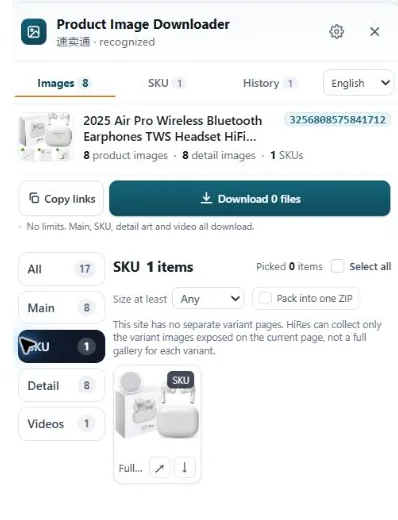
This is the step HiRes is built for. Open the listing, click the HiRes button, and the panel groups what the page exposes: main gallery, SKU images with their option labels where the page provides them, and the description stack as its own group. Save the files individually for free, or take a whole group as a ZIP in Pro ($19 once). Everything runs in your browser and lands in your Downloads folder, so the labels survive the trip. Our AliExpress image guide covers the manual method too, including trimming the size suffix off image URLs when you save by hand.
Step 3: Ask the supplier, and keep the answer
Public page, private rights. The photos belong to the supplier or their photographer, and putting them on your store without asking is the part of dropshipping that gets listings removed. The fix is boring and quick: message the supplier from the listing, say you sell their product and want to use their photos on your store, and wait for the reply.
Suppliers who live on wholesale volume say yes a lot. Screenshot the conversation and keep it with the product files. If they say no, or never answer, believe them: order a sample and shoot your own, or move to a supplier who replies. We go deeper on this in the guide to using supplier photos.
Step 4: Rebuild, don't clone
With permission sorted, build your listing like your own store, not a mirror. Pick the strongest gallery order for your page, not theirs. Use the spec images where buyers hesitate, usually right before the buy button. Write your own title and description from the facts in the detail images, in your customers' units and spelling. A cloned listing inherits the supplier's mistakes along with their photos, including the wrong dimensions you were supposed to catch in step 1.
What goes wrong when steps get skipped
- Skip the research: you list specs from the title instead of the size chart, and returns teach you the difference.
- Skip the labels: the navy photo ends up on the black option. Buyers notice before you do.
- Skip the permission: a complaint takes the listing down mid-campaign, and "everyone does it" is not a defense your marketplace accepts.
- Skip the rebuild: your store looks like a copy of a copy, at a higher price, and converts like one.
None of these need talent to avoid. They need the boring order: look, collect, ask, build.
Questions people ask
Can I use AliExpress photos on my own store?
Only with the supplier's permission. The photos belong to whoever made them, and a listing being public does not make its images free to reuse. In practice, many AliExpress suppliers say yes when you ask in the chat, because your store sells their product. Ask first, keep the reply, and treat silence as a no.
Why do my variant photos never match the options?
Because the label got lost on the way to your hard drive. On the page, each SKU photo is tied to an option like a color or a plug type. Saved as loose files named image1, image2, image3, nothing records which photo went with which option. Collecting them with the labels attached, or sorting them into per-option folders the moment you download, is what prevents the mix-up.
Do I need every description image from the listing?
No. The long description stack mixes useful material (dimensions, materials, what's in the box) with decorative banners you will never use. Take the spec and size images, plus any photo that answers a question buyers actually ask. Skipping the rest keeps your research folder readable and your own listing honest about what matters.
What should I do if a supplier never replies about photo permission?
Treat it as a no. Silence is not permission, and building a store on someone else's unanswered chat message is a weak position if a complaint lands. Your options are to order a sample and shoot your own photos, or pick a supplier who answers. Sellers who reply to a photo question usually reply to order problems too, which tells you something.
Collect the listing, keep the labels
HiRes groups an AliExpress page into gallery, SKU and description images, with option labels attached where the page provides them. Free for individual downloads.
Get HiRes for Chrome