
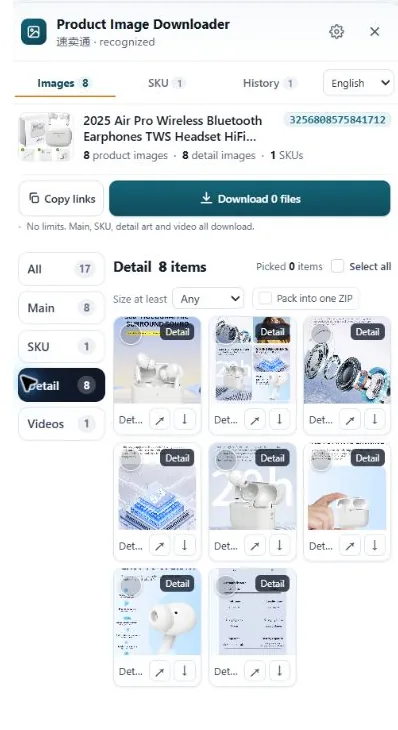
Pick three to five competitor listings in your niche. Collect every image each one uses, gallery, variant sets and A+ modules included. Score what you find against a short checklist, write down where each listing is weak, and build your own shot list out of those gaps. The teardown is research: you are studying their photos, never republishing them.
Step 1: collect the complete set, not just the gallery
Most teardowns fail at the first step because people only save the main gallery. That's the part of the listing your competitor polished for search results. The useful evidence sits one layer down: the variant photo sets, the A+ modules, the size chart buried in the description.
Work through each listing like a buyer with time to kill. Click every color and size option and note which ones get their own photos and which reuse the default set. Scroll the full description and save the detail images and charts. If the listing has a video, watch it and note what it shows that the photos don't.
Save the files in a folder per listing, named by position: 01-main, 02-angle, 03-variant-red, and so on. Screenshots are fine for quick notes, but save the real files where you can. You'll want to zoom into stitching, labels and print quality later, and a screenshot throws that detail away.
Step 2: score what you found
Open the folder and grade each listing against the same checklist. Scoring matters because memory flatters whoever you looked at last. A 0 means missing, 1 means present but weak, 2 means done properly.
| Check | What you're looking at | What a 2 looks like |
|---|---|---|
| Gallery size | How many images in the main set? | 7 or more, none wasted on near-duplicates |
| Variant coverage | Does every option get its own photos? | Every color shown on the product itself, not a swatch graphic |
| Angles | Front, side, back and close-ups all present? | All four, plus a detail shot of material or stitching |
| Scale and sizing | Size chart or dimension diagram included? | Real measurements inside the gallery, not only in the text |
| Infographics | Features explained visually? | Specs on images a skimmer will actually read |
| Lifestyle shots | Product shown in use, in a real setting? | At least one, with a person or setting for scale |
| Video | Does the listing include one? | Shows the product working, under about a minute |
Don't score taste. "I like this photo" is not a finding. Score coverage and information: could a buyer answer their sizing question from the images alone? Could they tell the red one from the orange one? Those gaps are where returns and bad reviews come from, and they're the gaps you can close.
Step 3: turn the gaps into your shot list
Now read across your scores instead of down. If all five competitors skip back views, your back view is cheap differentiation. If the top seller's size chart is the only one with real measurements, that's the standard your chart has to beat, not copy. The output of a teardown is a shot list for your own product: the angles, charts and explanations your listing needs, in the order a buyer looks for them.
Keep the teardown files. Listings change, sellers swap images after bad reviews, and a folder dated today becomes your before picture when you repeat the exercise next quarter.
Doing the collection step with HiRes
The slow part of all this is step 1. On Amazon, AliExpress, eBay and the other marketplaces HiRes supports, the extension's panel groups a page's images into main, variant and detail sets as you browse, so one pass per listing replaces the click-every-swatch routine. Individual downloads and copying image links are free; packaging a full set as a ZIP is part of Pro, at $19 one time. Everything runs locally in your browser, and the files land in your Downloads folder like any other download.
What HiRes won't do is the thinking. It hands you the complete set, grouped better than a folder of right-click saves. The scoring and the shot list are still your job, which is fine. That's the part that makes money.
A note on what a teardown is not. These photos belong to the brands and photographers who made them. Studying them, measuring your product against them and briefing your own photographer with them is normal competitive research. Lifting them into your own listing is infringement, and marketplaces remove listings and strike accounts for it. We covered the line in our guide on using supplier photos in your own listings.
Questions people ask
How many competitor listings should I tear down?
Three to five is the useful range. Fewer and you can't tell a category habit from one seller's shortcut. More and the scoring turns into a spreadsheet job you will abandon. Pick the top seller, two mid-range listings and one newcomer with strong reviews.
Can I use a competitor's photos in my own listing after a teardown?
No. A teardown is research, not a source of assets. The photos belong to whoever created them, and marketplaces take down listings that republish them. Use what you learned to brief your own photos instead.
What should I write down for each image?
Four things: what the image is (main, variant or detail), what it shows, its score, and anything it does that your listing doesn't. One line per image is enough. The notes matter more than the files a month later.
Does this work on marketplaces besides Amazon?
Yes. The checklist is the same on eBay, AliExpress, Etsy and the rest. What changes is where things hide: AliExpress keeps the facts in a separate description stack, and eBay variation photos attach to options rather than sitting in one gallery.
Start the teardown with the full set
HiRes gathers a listing's gallery, variant and detail images in one panel, so the audit starts from everything the page shows. Free for individual downloads.
Get HiRes for Chrome