
Main image: the product only, on pure white (RGB 255, 255, 255), no text, borders, watermarks or extra props. Size: at least 1000px on the longest side or zoom does not work; 1600 to 2000px or more is the sensible target. JPEG is preferred, with PNG, TIFF and GIF also accepted. Break the main image rules and Amazon can reject the photo or suppress the whole listing from search.
Before you rely on this page: Amazon adjusts image rules by category and marketplace. Everything here reflects the widely published requirements at the time of writing, so confirm the current rules for your category in Seller Central before a bulk upload.
The main image rules
The main image is the one in search results, and Amazon treats it as a product record, not an advert. The requirements:
- Pure white background, RGB 255, 255, 255. Not off-white, not light grey, not a soft studio gradient. A background that reads as white on your monitor can still fail if the file's corner pixels are 242, 242, 242.
- The product, and only the product. Nothing in the frame that is not included in the purchase. A lifestyle prop, a concealing hand, or packaging that is not part of the offer can all cause a rejection.
- No added graphics. No text, logos, watermarks, badges, borders or frames on the main image. "Best seller" ribbons belong in your A+ content, not here.
- A real, in-focus photo of the product as sold. Placeholder images and drawings that do not match the delivered item draw complaints and suppressions.
Your additional gallery images have more room: the product in use, scale references, detail close-ups. The strict purity test is aimed at slot one, the image Amazon puts in front of every searcher.
Sizes: the 1000px line and the 1600px habit
| Rule | Number | Why it matters |
|---|---|---|
| Zoom threshold | 1000px on the longest side | Below this, zoom does not activate and shoppers cannot inspect details |
| Recommended working size | 1600–2000px or more on the longest side | Keeps the zoomed view sharp on large screens and gives you cropping room |
| Preferred format | JPEG | Smallest hassle on upload; PNG, TIFF and GIF are also accepted |
| Main image background | RGB 255, 255, 255 | Any visible tint risks an image rejection or listing suppression |
An 800px main image may go through, but it cannot be zoomed, and next to zoomable competitors it looks like the budget option. Treat 1000px as the floor, 1600px as your default. If a supplier's photos top out below that, you need a reshoot, not an upload setting.
What gets images rejected or listings suppressed
- Off-white or busy backgrounds on the main image. The single most common failure, often inherited from a supplier photo shot on a grey studio sweep.
- Text, watermarks and promotional badges. Supplier packs are full of these. Fine as research references, unusable as a main image.
- Borders and frames added in an editor. Even a thin keyline counts as added artwork.
- Props that are not part of the product. A phone in the shot is fine if you are selling the phone. Next to the case you are selling, it is a problem.
- Files that are too small, corrupted or in an unsupported format. The boring failures are still failures, and they surface during bulk uploads at the worst moment.
Amazon's response ranges from rejecting the image to suppressing the listing in search until it is fixed. You usually find out from a performance notification, not at upload, which is why checking first is cheaper.
How to check downloaded reference images against the rules
Many sellers download a competitor's or supplier's photos as a starting point for listing prep. They are references, not uploads, but checking them tells you how much work your own shoot has to do:
- Check dimensions. On Windows, right-click the file and read the dimensions under Properties, then Details. On a Mac, open Preview and check Tools, then Show Inspector. Under 1000px on the long side means the source cannot support zoom.
- Sample the background. Use an image editor's color picker on a corner. Pure white reads 255, 255, 255. Supplier photos often sit at 240 to 250: close enough to look white, far enough to fail.
- Zoom to 100% and look at edges. Compression mush around the product outline means the file was resized or re-saved too many times to be your quality benchmark.
- Separate the reference from the upload. Keep downloaded photos in a research folder, and never let one drift into your listing by accident: that is both a policy problem and a rights problem.
Where HiRes fits into this
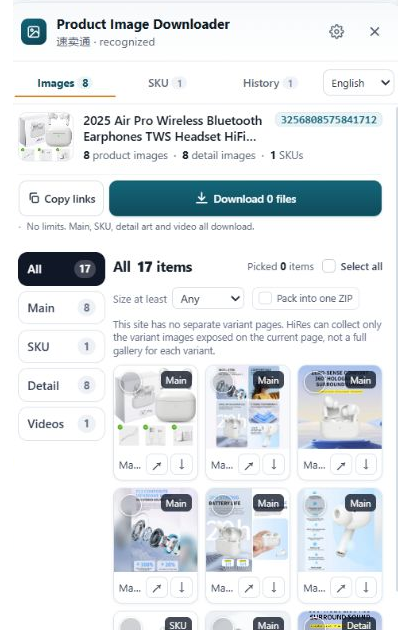
HiRes collects the gallery, variant and detail images from an Amazon page as the page exposes them, so you check the seller's actual uploads rather than right-click display copies. That makes the checks above honest: if the original is 1500px, you see 1500px, not a 500px thumbnail.
For your own files, Pro adds image resizing and JPEG quality controls, useful when a compliant original is larger than you want to upload. What no tool does is make a non-compliant photo compliant. A grey background stays grey until someone edits it, and a watermarked supplier photo stays unusable as a main image. Fix those at the shoot or in your editor.
Questions people ask
What is the minimum image size for Amazon listings?
The number that matters in practice is 1000px on the longest side, because that is where Amazon's zoom feature starts working. Smaller images can be accepted, but shoppers cannot zoom them, and that hurts conversion. Aim for 1600 to 2000px or more on the longest side so the zoomed view stays sharp.
Does every Amazon image need a pure white background?
No. The pure white rule, RGB 255, 255, 255, applies to the main image, the one shown in search results. Additional gallery images can show the product in use, with props and settings that make sense. The main image cannot: no text, borders, watermarks, or props that are not part of the product.
Which file formats does Amazon accept for product images?
JPEG is the preferred format and the one Amazon recommends. PNG, TIFF and GIF are also accepted at the time of writing. In practice almost every seller works in JPEG, because the files are smaller and upload without surprises. Check your category's rules in Seller Central before a big upload.
Why was my Amazon listing's image suppressed?
The usual causes are a main image that is not pure white, added text or a watermark, a border or frame, props that are not part of the product, or a file too small or in an unsupported format. Amazon can reject the image or suppress the listing from search until you replace it with a compliant one.
Check the real files, not the thumbnails
HiRes pulls the gallery, variant and detail images an Amazon page actually holds, so your size and quality checks run on the seller's originals. Free for individual downloads.
Get HiRes for Chrome