
For anything shown on a screen, resolution means pixel dimensions, full stop. DPI and PPI are print settings stored inside the file; browsers and marketplaces ignore them. Marketplace zoom runs on pixels: Amazon zoom starts at 1000px on the longest side, and 1600 to 2000px is the range that holds up. Check a file's real dimensions before you judge it: the KB size and the DPI tag both lie.
Pixels are the only number a screen cares about
An image is a grid of pixels. A 2000 x 2000 photo holds four million of them; an 800 x 800 photo holds 640,000. When a shopper zooms in on a listing, the site is showing them a bigger slice of that grid. A big grid has detail to spare. A small grid runs out fast, and the picture goes soft.
That is the whole story for online selling. Displays work in pixels, so when someone says "high resolution," the only useful follow-up question is: how many pixels, wide and tall?
Where the 300 DPI idea comes from, and why it misleads you
DPI stands for dots per inch, and it belongs to printing. It tells a printer how tightly to pack pixels onto paper. 300 DPI is the standard for crisp print, which is why the number sticks in people's heads.
Inside a digital file, though, the DPI value is just a note in the metadata. It changes nothing about the pixels themselves. Set a 1000 x 1000 photo to 300 DPI in an editor and it prints at about 3.3 inches wide. Set it to 72 DPI and it prints at nearly 14 inches, blurrier on paper, pixel for pixel identical on screen.
PPI (pixels per inch) is the same idea with the same limit. A supplier who sends "300 DPI" files at 800px is not necessarily lying; they may genuinely think the tag is the quality. The dimensions tell you the truth.
What "high resolution" means on each marketplace
Each marketplace sets its own bar, usually tied to zoom. At the time of writing:
- Amazon. Zoom kicks in when an image is at least 1000px on its longest side. 1600 to 2000px or more is the recommended working range.
- eBay. The minimum is 500px on the longest side, which is low enough to look rough. 1600px is the recommended size for the zoom view.
- Etsy. Etsy recommends images at least 2000px on the short side, commonly cited as 2700 x 2025. A lot of supplier photos fall short of that.
- AliExpress. 1000 x 1000 or larger is recommended so zoom works, and square images tend to perform best in search.
Notice none of those specs mention DPI. They are all pixel counts. Platforms adjust them now and then, so confirm the current numbers in your seller center before a big upload.
File size is not resolution
The other number people trust is the file size, and it misleads too. Kilobytes depend on format, compression level, and how much fine detail or noise the photo contains. A grainy 1000px photo of a knitted jumper can weigh 900 KB. A clean 2000px studio shot of a plain white mug can weigh 300 KB. The smaller file has four times the pixels.
File size still works as a smell test: a product photo that arrives at 40 KB has been compressed hard or started tiny, and both hurt. But treat KB as a warning flag, not a measurement.
How to check a file's real dimensions
Takes ten seconds, once you know where to look:
- Windows: right-click the file, open Properties, go to the Details tab. Width and height are listed in pixels.
- Mac: right-click, Get Info, look under More Info for Dimensions. Preview also shows them under Tools, Show Inspector.
- In Chrome: drag the file into a tab, or open the image URL directly. The tab title shows the dimensions, and the cursor turns into a magnifier when the image is bigger than the window.
- On your phone: open the photo's info panel. Chat apps often deliver a far smaller file than the supplier sent, and the info panel shows what you actually got.
Do this before you build a listing around a photo set. Finding out at upload time that your main image is 900px wide means redoing work.
Getting the real file so you can measure it
One trap: the file you save is often a display copy, a few hundred pixels wide, while the marketplace holds a larger original for its zoom view. Judging a listing's image quality from that small copy gives you the wrong answer about what the seller uploaded.
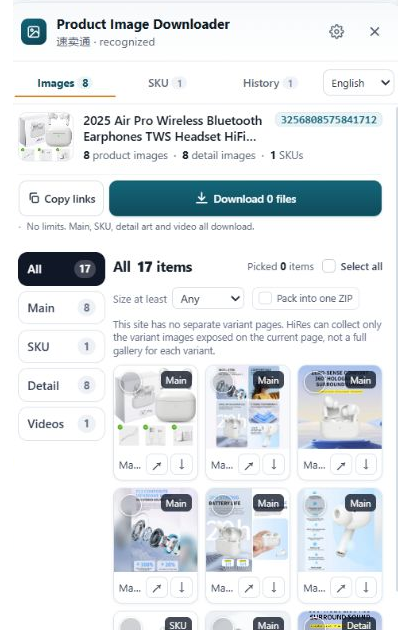
That is the gap HiRes exists to close. It is a Chrome extension that runs on product pages across Amazon, AliExpress, eBay, TikTok Shop, Temu, Etsy, Lazada and Walmart. The panel lists the images the page exposes, grouped as main, variant and detail images, and you save the underlying files rather than the thumbnails on screen. Check one file's dimensions and you know exactly what that listing is working with. Individual downloads are free; the honest limit is that no tool can hand you pixels the seller never uploaded.
Questions people ask
Is 300 DPI better than 72 DPI for product images?
Not on a screen. DPI is a print instruction stored in the file, and browsers and marketplaces ignore it. A 2000px image tagged 72 DPI shows exactly the same detail as the same 2000px image tagged 300 DPI. The 300 DPI version just prints smaller and sharper on paper. For anything viewed on a phone or monitor, count pixels, not DPI.
How many pixels does a product image need for marketplace zoom?
On Amazon, zoom kicks in when an image is at least 1000px on its longest side, and 1600 to 2000px holds up better once a shopper zooms in. eBay asks for a 500px minimum and recommends 1600px for its zoom view. Etsy suggests images around 2000px on the short side. Requirements change, so check your seller center for the current numbers.
Does a bigger file size in KB mean higher resolution?
No. File size is about compression, format and how busy the photo is. A noisy photo of a knitted sweater at 1000px can weigh more than a clean 2000px shot of a white mug. Dimensions in pixels tell you the resolution; the KB number mostly tells you how hard the file was to compress.
Can I raise an image's resolution by changing the DPI setting?
No. Editing the DPI value only changes the print-size note inside the file. The pixel count stays the same, so the on-screen detail stays the same. The only way to get more real resolution is a bigger original file from whoever shot or supplied the photo.
Measure the real file, not the thumbnail
HiRes saves the full-size images behind the product pages you are already viewing, grouped and labelled. Free for individual downloads, no account needed.
Get HiRes for Chrome