
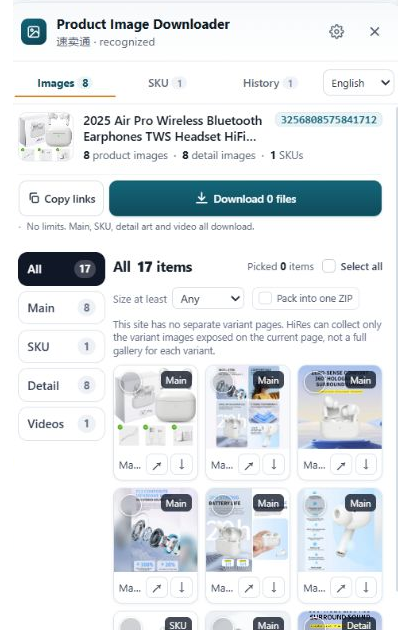
Ask for four specific things: original files at full size, every variant, the detail images, and written permission that covers marketplaces and ads. Ask in one message, not five. If low-resolution files come back, the usual cause is the chat app compressing them, so ask for a ZIP or drive link. And keep the permission message saved with the images, because no reply at all is not a yes.
What to ask for, specifically
"Send me the pictures" gets you whatever is on the sales rep's phone. A specific list gets you the folder they send to their bigger buyers:
- Original files, not chat photos. Full-size images, sent as file attachments or a download link. Photos pasted into a chat window get compressed on the way to you, often down to 800px or less.
- Every variant. Each color, size and bundle you plan to sell, labeled with the option it belongs to. Unlabeled variant photos are a sorting job you'll do at midnight later.
- The detail images. Size charts, dimension diagrams, material close-ups, what's-in-the-box shots. These live in the listing's description area, not the gallery, and suppliers forget them unless asked.
- The product video, if one exists. The original file, not a link to the listing. Links die. Files don't.
- Written permission. One message where the supplier confirms you can use the images and video in your store listings and your ads. This is the part sellers skip, and it's the part that matters when a marketplace asks questions.
Ask when you're placing a sample order or a first real order, not after your listing is live. A supplier mid-negotiation answers carefully. A supplier you already paid answers when they get around to it.
Three messages you can copy and send
Short, polite, and specific. Fill in the brackets and send as is.
1. The first ask
Hi [name], I'm preparing my store listing for [product]. Could you send me the original product images at full size, for all colors/variants, plus the size chart and detail images? If you have a product video, the original file would help too. A ZIP file or a drive link is best, as chat compresses the photos. Also, please confirm in writing that I can use these images and video in my store listings and advertisements. Thank you.
2. When they send low-resolution files
Thanks for sending these. The files came through at [800px], which is too small for my store. I think the chat app compressed them. Could you put the original files in one ZIP, or share them as a drive link? The original size is what I need. Happy to wait until tomorrow if that's easier.
3. The permission confirmation
One more thing before I publish: please confirm that [supplier/company name] gives me permission to use the product images and video you sent for [product] in my online store listings (Amazon, eBay, my own website) and in my ads. A simple "yes, you can use them" in reply is enough. I keep it on file in case the marketplace asks.
That last line does quiet work. Telling a supplier the permission goes on file discourages them from offering photos they don't actually own, which happens more often than anyone admits.
Store the yes where you'll find it
A permission you can't produce is worth about as much as no permission. When the reply comes:
- Screenshot the message with the supplier's name, the date and your ask all visible in one frame, not cropped to just the "yes".
- Save the screenshot in the same folder as the images it covers, with a plain name like
permission-suppliername-2026-11.png. - If your chat platform has an export or backup function, use it for that conversation. Chat apps get reinstalled, phones get replaced, accounts get locked.
Do this the day the reply arrives. Rebuilding the paper trail six months later, after a takedown notice, is the version of this job nobody enjoys.
What silence means
Sometimes the thread just stops. The supplier answers your price questions, ships your samples, and never touches the permission message. Read that correctly: it's not a yes. It's usually one of two things. The rep doesn't know who owns the photos, or the rep knows they belong to a brand the factory supplies and would rather not say so in writing.
Either way, your options are the same as with an outright no. Use the files for research, specs and planning. For anything customer-facing, shoot your own photos or wait until a supplier gives you the yes in writing. Our companion guide covers the bigger picture: when supplier photos are safe to use, and what a takedown actually costs you.
Questions people ask
What exactly should I ask a supplier to send?
Four things: the original image files at full size, photos for every variant you plan to sell, the detail images (size charts, dimensions, materials), and the product video if one exists. Then one more thing, in writing: permission to use that material in your listings and ads. Files without permission are only half the job done.
The supplier sent small, compressed images. What now?
They probably sent the photos through a chat app, which shrinks images before delivering them. Ask for the same files as a ZIP or cloud drive link, sent as file attachments rather than inline photos. That one change usually takes you from 800px previews to the full-size originals.
The supplier never replied about permission. Can I use the images anyway?
No. Silence is not a yes. A supplier who won't confirm in writing may not own the photos either, since factories often pass around images shot by a brand or another seller. Use what they sent for research, and shoot your own photos or wait for a written yes before anything goes in a live listing.
How should I store the permission once I have it?
Save the message itself, not a summary of it. Screenshot the chat with the supplier's name and the date visible, export the chat if the platform allows it, and keep the screenshot in the same folder as the image files it covers. If a marketplace ever asks, you want to produce it in minutes, not dig through a year of messages.
While you wait for the supplier to reply
HiRes pulls the gallery, variant and detail images from the listing you're already viewing, for research and comparison. Free for individual downloads.
Get HiRes for Chrome