
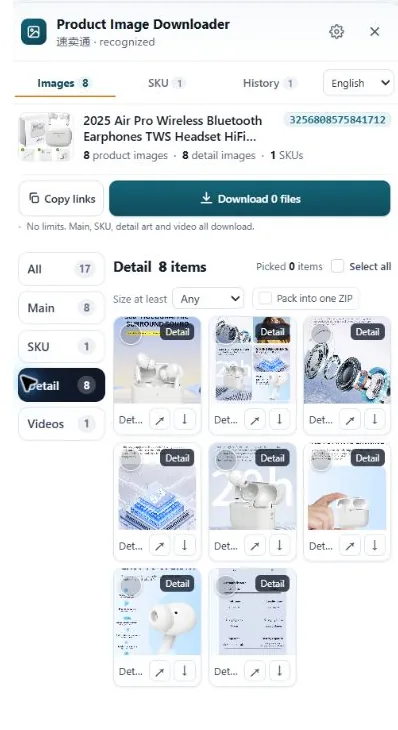
Yes. AliExpress product images can be saved from the page, including the per-option SKU photos and the long description image stack further down. If the listing is your supplier's and they've agreed to supply you, using their photos is normally part of the deal. A stranger's listing is a different story.
Yes, you can download images from AliExpress. Open the product page in a desktop browser and every photo the page loads, gallery, SKU and description images alike, can be saved. The real questions are whether you're getting the full-size files, and whether the photos are yours to use.
The permission question comes first here
AliExpress is where a lot of sellers source products, so "can I download these" usually means "can I use my supplier's photos in my store." If you buy from that supplier and they've shared the image pack or said yes in chat, that's the normal arrangement. Keep the message where they said it.
If the listing belongs to a seller you have no relationship with, treat the photos like anyone else's property. Download them to study the product, check specs and compare suppliers. Don't lift them into your own listing and hope nobody notices. Brands do notice, and marketplaces act on complaints.
How to save AliExpress images, all three sets
A listing carries more images than the gallery at the top:
- Gallery images. Right-click each one, or open it in a new tab first. Displayed files often carry a size suffix such as
.jpg_960x960. Trim the suffix off the URL and you usually get the larger original. - SKU images. Every color or style option has its own photo, and it only fully loads when you select that option. Click through each one and save as you go, or you'll end up with the default color only.
- Description images. The spec diagrams, size charts and detail shots live in a separate stack further down the page. Scroll slowly to the bottom so lazy-loaded images actually appear, then save them.
Choice listings and standard listings lay these out slightly differently, and the mobile app makes all of it harder. Desktop Chrome is where this is painless.
Where people get stuck
Two things, mostly. The first is size: the photo you right-click is a resized display copy, so it looks soft when you zoom in, even though a bigger file sits behind the suffix in the URL. The second is completeness. Sellers grab the gallery, forget the description stack, and lose the size chart, which is the one image their own listing actually needed.
Doing it with HiRes
HiRes works on AliExpress product pages in Chrome. The panel lists what the page exposes in groups: gallery images, SKU images with the option labels the page provides, and the description images below. Save individually for free, with no limit on how many product pages you work through, or take a whole set as a ZIP with Pro ($19 one-time). Everything runs locally, so files go from the page straight to your Downloads folder. One limit to know: images that only load after scrolling still need the page to load them first, and a login wall shrinks what any tool can see.
Asking the supplier? A one-line message asking to use their product photos, kept in your chat history, is worth more than any assumption. More in our guide on using supplier photos in your own listings.
Questions people ask
Can I use AliExpress photos in my own store?
If they're your supplier's photos and the supplier agreed, that's the standard setup for a lot of stores. Keep proof of the agreement. If the photos come from a listing you have no relationship with, use them for research only. Republishing them risks takedowns and complaints from the brand that owns them.
Why do AliExpress images download smaller than they look?
The page displays a resized copy with a size suffix in the URL, something like .jpg_960x960. Removing the suffix usually serves the larger original the seller uploaded. Some suppliers upload modest files to begin with, and no method adds resolution that was never there.
How do I download the SKU image for each color?
Select each option on the page so its photo loads, then save it. Miss a click and you miss that color's photo. HiRes lists the SKU images it finds as their own group, with option labels where the page provides them, so you can check the set is complete before saving.
Yes, and here's the faster way
HiRes gathers the gallery, SKU and description images from the AliExpress page you are already on, in one panel. Free for individual downloads, no account needed.
Get HiRes for Chrome