
Yes, you can download images from Amazon product pages. Right-clicking gets you the small display copy; the full-size file needs the zoom viewer or a URL edit. Downloading for research is normal seller work. Publishing those photos in your own listing without permission is not.
Yes. Any image an Amazon product page loads in your browser can be saved to your computer, and nothing about the process is technical or hidden. The catch is never whether you can download. It's which size you get, and what you're allowed to do with the file afterward.
Downloading is fine. Republishing usually isn't
Saving a photo for product research, spec checks, a supplier comparison or your own reference file is routine, and sellers do it all day. The photos still belong to the brand, the supplier or the photographer who made them, though. Amazon's rules and plain copyright both land in the same place: their listing, their images.
Put the same photo in your own live listing without permission and it stops being research. That's the version that gets listings taken down and accounts flagged, especially when the photo is a brand's hero shot or a competitor's lifestyle image. If the supplier sent you the image pack and said use it, that's permission. A photo you found on a listing is not.
How to download Amazon images in practice
For one or two photos, the manual route is fine:
- Click the main image to open the enlarged view, then open it in a new tab.
- Check the URL for a size segment like
_AC_SL1500_. Delete that segment and reload to get the largest version Amazon holds. - Right-click and save. Repeat for each gallery thumbnail, and click every color swatch, because variant photos only load once that variant is selected.
- Scroll down to the A+ modules. Those banners and comparison charts are separate image files, and they're easy to miss entirely.
Expect the ceiling to be whatever the seller uploaded. Plenty of listings top out at 1500 or 2000 pixels on the long edge, and older ones at less. There's no bigger file hiding behind the page than the one in the zoom viewer.
Where the manual method falls down
It works. It's just slow, and it skips things. A nine-image gallery with four variants and an A+ section can mean thirty-plus separate saves for one product. Multiply that by a research list of twenty products and most people give up halfway, which is how reference folders end up missing exactly the variant shot they needed later.
Doing it with HiRes
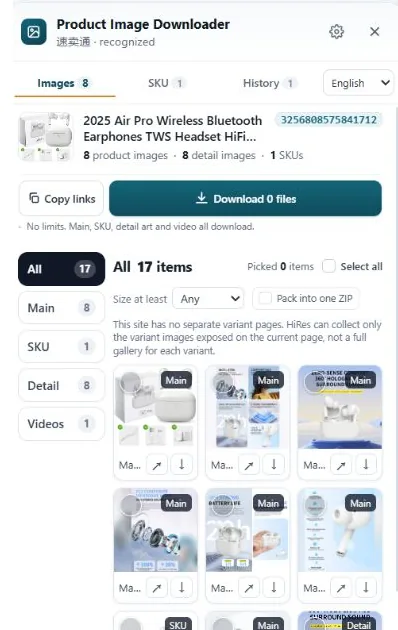
HiRes puts a button on supported Amazon product pages. Open the panel and the images the page exposes are already grouped: main gallery, variant images with their option labels, detail and A+ images. Save files one by one for free, or package a selection as a ZIP with Pro ($19 one-time). It runs locally in Chrome, files land in your Downloads folder, and nothing is uploaded to us. The limit is the same one every tool has: if the page doesn't load an image, because of a login wall or a regional storefront quirk, there's nothing there to save.
Want the full walkthrough? Our guide to downloading Amazon product images in high resolution covers the gallery, swatches and A+ modules step by step.
Questions people ask
Is it legal to download product images from Amazon?
Downloading for research, specs and comparison is standard practice and not what enforcement targets. What creates trouble is republishing: using brand or supplier photos in your own listing, ads or store without permission. That can trigger takedowns and account strikes. This is practical experience, not legal advice.
Why is the Amazon image I saved so small?
Because the gallery shows a display copy, usually around 500px, and right-click saves the copy on screen. The larger version loads in the zoom viewer, or by removing the size code from the image URL. You still can't get more than the seller originally uploaded.
Can I download every image from an Amazon listing at once?
Not with the right-click menu; that's one file at a time, and variant sets only appear after you click each swatch. A downloader like HiRes collects the gallery, variant and A+ images in one panel, so you pick the set instead of hunting file by file.
Yes, and here's the faster way
HiRes gathers the gallery, variant and detail images from the Amazon page you are already on, in one panel. Free for individual downloads, no account needed.
Get HiRes for Chrome