
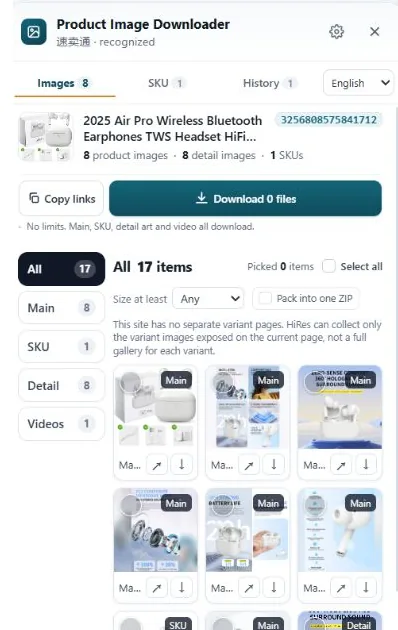
A copied link is enough when the other person just needs to look, soon. Download the file when the image has to survive: listings get edited, image URLs change, and some marketplaces block their photos from loading anywhere else. Most sellers end up doing both, links for handoffs, files for anything they intend to keep.
When a link is enough
Links weigh nothing, and they always point at whatever the listing shows right now. That makes them the right choice for most day-to-day handoffs:
- Briefing a VA or designer. "Use the third photo, the one with the measurements" lands better as a clickable link dropped into the task than as an attachment they have to match against a folder.
- Quick checks. A "is this the right red?" question in chat gets answered in seconds from a link. Nobody needs a file for that.
- Spec sheets and comparison notes. When you're collecting dimensions and features from five suppliers, a link next to each note keeps the document light and the source one click away.
- Sharing what a listing currently shows. If a supplier swears they fixed the photos, the link proves it either way. A file you saved last week proves nothing.
The pattern: if the job is look, check or point, and it's happening today, send the link.
When you need the actual file
Links have a shelf life, and it is shorter than most people assume.
- Links rot. Sellers edit listings, swap photos and delete variants. Some marketplaces change image URLs when a listing is updated, and a removed listing takes every image with it. The teardown folder you built from links in March can be a page of errors by June.
- Hotlink protection. Plenty of image servers check where a photo is being loaded from and refuse to serve it to other sites or tools. The link opens fine in your browser tab and shows a broken icon everywhere else.
- You want to work on the image. Zooming into stitching, cropping a detail for a supplier dispute, printing a spec sheet for the warehouse. All of that needs the file, ideally the full-size one, not the 500px display copy.
- You're building an archive. Research you plan to revisit, teardown notes, a record of what a supplier's listing looked like on a given date. Archives made of links are archives made of hope.
Keeping links organized
If you do keep links, keep them with context or don't keep them at all. A bare column of image URLs tells you nothing a month later, because the file names are meaningless strings.
One document per product works well: the source page URL at the top, the date you collected, then each image link with a short label you wrote yourself. "Variant, red, front." "Size chart, inches." Note next to it whether you also downloaded the file. Five minutes of labelling while the listing is open in front of you saves an hour of clicking through mystery URLs later.
Grabbing either one with HiRes
On the marketplaces HiRes supports, the panel lists a product page's images in groups: main gallery, variant images with their option labels where the page provides them, and detail images. Every entry gives you both choices side by side. Copy the link for a handoff, or download the file when it has to last. Copying links and individual downloads are both free, with no account and no cap on how many product pages you open. Downloaded files save straight to your Downloads folder, and everything runs locally in your browser. Nothing passes through our servers, because there is nothing for a server to do here.
The honest limit is the same one from the sections above: HiRes copies the link the page is using. If the marketplace later changes that URL or pulls the listing, the link dies like any other. That's a reason to download the keepers, not a flaw a tool can fix.
Questions people ask
Do copied image links expire?
Some do. Marketplace image URLs can change when a seller edits a listing, and a removed listing takes its images with it. Links copied for a quick handoff are fine. Anything you still need next month, download.
Is copying an image link the same as downloading it?
No. A link is an address, not the photo. Whoever opens it loads the image from the marketplace's server at that moment, at whatever size that URL serves. A downloaded file is a copy you keep, so you can zoom into it, rename it and find it again later.
Can I paste a marketplace image link into my own store or listing?
Usually not, for two reasons. Many marketplace image servers block hotlinking, so the photo simply won't load on your page. And the photo belongs to its creator, so displaying it in your listing needs permission, same as uploading a copy would.
Grab the link or the file, your call
HiRes puts both options next to every image on a supported product page. Copy a link for the quick handoff, download the file when it has to last.
Get HiRes for Chrome