
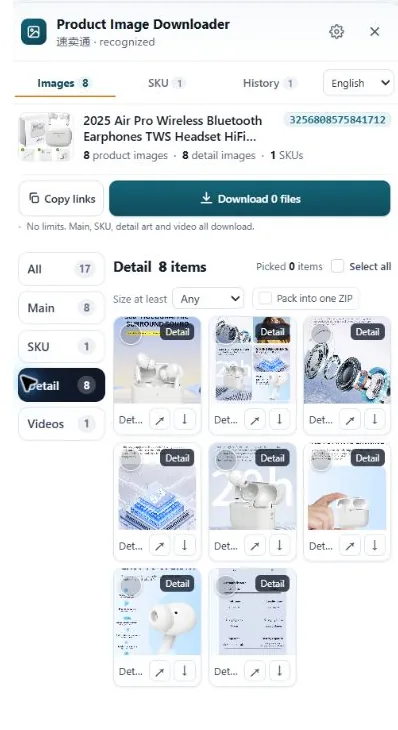
Lazada (part of the Alibaba family, like AliExpress) serves gallery photos through an image CDN that resizes on request. The size is written into the image address, and removing the sizing suffix usually returns the seller's original. Option images load when you select the option, and description images only appear as you scroll. A downloader panel pulls all three groups together once the page has loaded them.
Why Lazada hands you a small file
Most Lazada shopping happens on phones, on connections that vary a lot across Southeast Asia. So the product page is stingy: it asks the image CDN for copies sized for the screen, not for your research folder. The photo you see in the gallery might be rendered at 750px or less even when the seller uploaded 1500px or more.
The giveaway is the image address. Lazada photos are served from Alibaba's image hosts, and their URLs commonly end with a sizing suffix, something like .jpg_720x720q80.jpg or a similar pattern with different numbers. That suffix is a resize order. Strip it off and the same address usually returns the photo at the size it was uploaded, or at least the largest size the CDN keeps.
Method 1: trim the size suffix and work the options
For a handful of photos, doing this by hand is fine:
- Open the product page on desktop and click a gallery photo to view it large.
- Right-click and open the image in a new tab.
- Look at the end of the URL. If there is a sizing suffix after the main file extension (extra dimensions, a q-value, a second extension), delete everything from that suffix onward.
- Reload. If the image comes back noticeably larger, save it. If the tab errors or returns the same size, that photo was probably uploaded small and this is all there is.
- Now click each color or size option on the page and repeat for its photos. Option images are a separate set, and they are labelled by option in the listing, which is exactly the information you lose if you dump everything into one unnamed folder.
Then scroll. Lazada description sections are long stacks of images: size charts, feature callouts, packaging shots, sometimes the most useful spec information on the whole page. They load lazily as you scroll, so a fast trip to the bottom and back up is not optional. Images that never scrolled into view never loaded, and no tool can save a file the page never fetched.
Where the manual method breaks down
Three places, in our experience. First, volume: a Lazada listing with five options and a twenty-image description stack is pushing forty files, each with its own suffix to trim. Second, the app habit. Many SEA sellers work inside the Lazada app, where long-press saving is inconsistent and screenshots are the fallback everyone regrets later. Desktop is where the real files are. Third, regional storefronts: the same product often appears on Lazada SG, MY and TH with the same photos, and it is easy to save the small set three times instead of the big set once.
Doing it with HiRes instead
HiRes is a Chrome extension that supports Lazada product pages across its country storefronts. Open the listing on desktop, scroll once through the description so every image loads, then click the floating HiRes button. The panel groups what the page exposed: main gallery in one group, option images with their labels where Lazada provides them, and the description images in their own group. Save files individually for free (no account, no daily limit) or take a bigger selection as a ZIP on Pro, which is $19 once.
Limits, stated plainly. HiRes can only collect what the page in front of you has loaded, so the scroll-through matters, and an option you never clicked may not have contributed its photos. Some overseas listings also show reduced content until you deal with a login prompt or a location check. Where that happens you will see a shorter list, and that shorter list is the truth about that page, not a bug. Files download straight to your computer; nothing is uploaded to us in between.
Research copies vs. your own listing. Saving a competitor's or supplier's Lazada photos to study specs and pricing is everyday seller work. Re-uploading those same photos as your own listing crosses into the rights holder's territory, and Lazada acts on image complaints like every other marketplace. See our guide on when supplier photos are safe to use.
Questions people ask
Why do Lazada images save smaller than they look?
Lazada's pages display resized copies served by its image CDN, and right-click saves the copy your browser was shown. The address of that copy usually carries a size code. The underlying photo the seller uploaded is bigger, and trimming the size code off the image URL, or collecting the listing with a downloader, reaches the larger version.
Does this work on Lazada Singapore, Malaysia and the other country sites?
Yes. Lazada's country storefronts in Singapore, Malaysia, Thailand, Vietnam, the Philippines and Indonesia run on the same platform and the same image system, so the gallery, option images and description stack behave the same way. What changes between countries is the catalogue, not the image mechanics.
How do I get the images for each color or size option?
Select the option on the page first. Lazada swaps the gallery to that option's photos when you click it, and options you never select may never load their images. Work through the options you care about one at a time, or open the HiRes panel, which lists the option images as their own labeled group where the page provides labels.
Can I reuse Lazada product images in my own shop?
The images belong to the seller or brand that uploaded them. Downloading for research, price checks and spec comparison is normal practice among sellers. Publishing the same photos in your own live listing without permission risks a complaint and removal, so get permission or shoot your own for anything customers will see.
One pass, all three groups
HiRes gathers the gallery, option and description images from the Lazada page you are already on, in one panel. Free for individual downloads, no account needed.
Get HiRes for Chrome