
Marketplaces serve WebP to Chrome because it makes pages load faster, so downloads often arrive as WebP even when the seller uploaded JPG. WebP is slightly more efficient; JPG is accepted everywhere. For listing uploads, convert WebP to JPG once, from the largest file you have, at quality 85 to 92, and keep the originals untouched as your masters.
Why your downloads arrive as WebP
Every time your browser requests an image, it quietly tells the server which formats it can handle. Chrome has supported WebP for years, so large marketplaces send WebP copies of product photos: same picture, smaller file, faster page. Amazon, AliExpress, Temu and the rest all do versions of this.
The seller probably uploaded a JPG. The platform converted it for delivery. When you save the image, you get the delivered copy, not the file sitting in the seller's upload history. That is why renaming the file from .webp to .jpg does not work. The extension is not the format; the bytes inside are WebP whatever you call them, and strict upload forms check the bytes.
How the two formats actually differ
Both are lossy formats, meaning they shrink files by discarding detail your eye is unlikely to miss. The differences that matter for product work:
- File size. Google's own comparison tests put WebP roughly 25 to 34 percent smaller than JPG at similar visual quality. That gap is the whole reason platforms serve it.
- Quality at small sizes. WebP holds up better when files get tiny, like thumbnails and feed images. At the 1600px-plus sizes sellers care about, a good JPG and a good WebP are hard to tell apart.
- Extras. WebP supports transparency and a lossless mode. JPG supports neither, which only matters if you are saving logos or cutouts, not standard product photos.
- Compatibility. JPG opens in everything made in the last thirty years. WebP opens in modern browsers and current editors, but older software, some supplier systems and most marketplace upload forms still trip over it.
So WebP is not a downgrade. It's a delivery format that was never meant to be your working file.
What marketplaces accept at upload time
Serving a format and accepting it are different decisions. Marketplaces serve WebP aggressively and accept it reluctantly. Amazon's accepted list, at the time of writing, is JPEG (preferred), PNG, TIFF and GIF; WebP is not on it. eBay and Etsy upload flows are built around JPG and PNG. Your own store platform may take WebP happily, but the moment you syndicate listings to a marketplace, JPG is the safe common denominator.
Practical rule: browse and research in whatever format arrives. Convert to JPG for anything you upload, send to a supplier, or hand to a designer. Keep the original download as the master in case you need to convert again.
Converting without wrecking the photo
Every lossy conversion costs a little detail, because the new file is compressed from an already-compressed copy. You can't avoid that cost entirely, but you can pay it once and pay it small:
- Start from the largest version of the image you can get. Converting the 500px display copy just gives you a JPG of a small photo.
- Convert once, straight from WebP to JPG. Never chain formats (WebP to PNG to JPG) and never re-save a JPG as a JPG to "fix" it. Each extra save is another round of loss.
- Use a quality setting around 90. Higher buys almost nothing visible; lower starts to chew on edges, fabric texture and printed text on packaging.
- Keep the original WebP files in a master folder. Storage is cheap; re-downloading a listing that changed or vanished is not always possible.
One method to skip: screenshotting the image to turn it into a JPG. A screenshot caps the size at your screen's resolution, adds your display's scaling, and usually ends up worse than the file you started with.
Where HiRes fits in
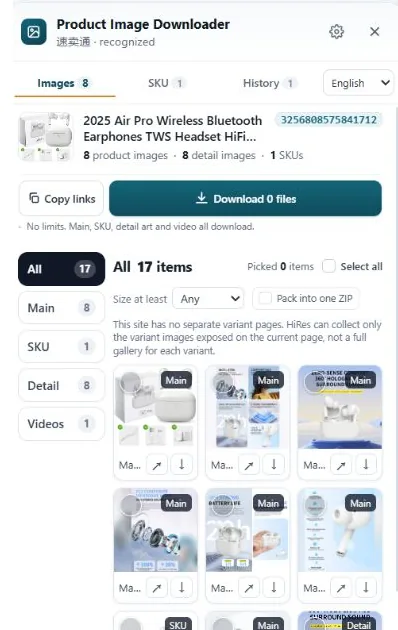
HiRes, our Chrome extension, collects the images a product page exposes on Amazon, AliExpress, eBay, TikTok Shop, Temu, Etsy, Lazada and Walmart, grouped into main, variant and detail sets. Individual downloads are free, and you get the file the page serves, which is the honest starting point for any conversion.
Pro ($19, one time) adds image resizing and JPEG quality controls at save time, which covers the common case directly: set the output dimensions and a quality around 90, and the files land in your Downloads folder as JPGs sized for the listing form you are about to use, instead of a folder of WebP files waiting on a separate conversion step. What it won't do is add detail the original never had. Format juggling fixes compatibility, not resolution.
Questions people ask
Why do my product image downloads save as WebP?
Because that is what the marketplace served your browser. Chrome tells the site it accepts WebP, the site sends a WebP copy to keep pages fast, and your download is that served copy, even if the seller originally uploaded a JPG. The .webp extension is honest about what actually arrived.
Is WebP better quality than JPG?
At the same file size, usually yes. WebP holds detail a bit better than JPG at small sizes, which is why platforms like it. At the large sizes product photos use, the gap shrinks, and a JPG saved at quality 90 from a good original looks the same to a shopper. Format matters less than starting from the biggest original.
Can I upload WebP images to Amazon or eBay?
Plan on converting first. Amazon's accepted list is JPEG (preferred), PNG, TIFF and GIF, with no WebP on it at the time of writing, and most marketplace upload forms are built around JPG and PNG. A converted JPG at a sensible quality setting uploads everywhere and loses nothing a buyer can see.
What JPEG quality setting should I use for product photos?
85 to 92 is the working range for most sellers. Quality 100 sounds safest but inflates the file for a gain your eye cannot find, and settings under 75 start to show blocky artifacts around edges and text. If a marketplace recompresses uploads anyway, saving at 90 keeps you clear of visible damage.
Downloads that land ready to upload
HiRes collects a listing's main, variant and detail images in one panel, with resizing and JPEG quality controls in Pro when your listing form wants JPG. Free for individual downloads.
Get HiRes for Chrome