
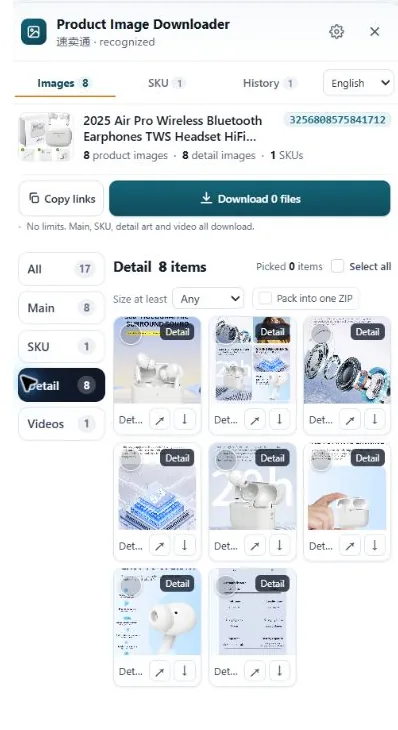
At the time of writing, an AliExpress listing takes up to 6 gallery images plus one image per SKU option. Square files at 1000x1000 or larger are the working standard: that is what keeps zoom alive and search thumbnails sharp. The first image should be the product on a clean background, with the promotional material pushed further down. Confirm current figures in your seller center, because AliExpress adjusts these rules.
How the image slots break down
| Slot | Count | Notes |
|---|---|---|
| Gallery images | Up to 6 | The set at the top of the listing. First image is the search thumbnail. |
| SKU images | 1 per option | One image tied to each color, size or model option. Not optional if the option looks different. |
| Description images | Separate stack | The long vertical set in the product detail section. Size charts and detail shots live here. |
| Recommended size | 1000x1000 or larger | Square. Smaller files publish but lose zoom and sharpness. |
| First image | White or clean background | Product fills the frame. No heavy text, borders or watermarks. |
Six gallery slots is tight. On Amazon you can spread out; on AliExpress you pick your six and the rest of the story moves to the description stack. Plan the six like a strip: product front, product angle, the detail that sells it, in use, size or specs, and one slot kept spare for the shot buyers always ask about in messages.
Why square, and why 1000px
AliExpress search results are a wall of squares. A wide photo gets cropped or padded to fit that square, and the crop is the platform's choice, not yours. Exporting square yourself means the thumbnail buyers scroll past is the one you composed.
The 1000px line is about zoom. Listings at 1000x1000 and up get the magnified view on desktop, where buyers check build quality, fabric, ports and print. Below that, the gallery is a take-it-or-leave-it picture. Plenty of supplier packs ship at 800x800 or even 750x750, which is why so many otherwise decent listings feel cheap on a monitor. If your supplier's originals are small, ask for the bigger files by name. Factories usually have them; the pack you were sent was just compressed for easy messaging.
SKU images are not decoration
Each option needs its own image, and that image needs to be the option. When a buyer picks the grey version and the gallery shows the black one with a small option thumbnail doing all the work, you get the two classic outcomes: the buyer leaves, or the buyer orders and opens a dispute about receiving the wrong color. Keep the link between option and photo intact when you collect source material too. A folder of forty loose images with no labels is a dispute waiting for a date.
Where sellers trip up
Three patterns repeat. First, the 800px supplier pack described above. Second, text-heavy banners in slot one: a first image covered in badges, discount claims and borders fights the clean-background preference and dates the listing the moment the promotion ends. Third, treating the description stack as gallery overflow. Buyers on mobile do scroll it, but the six gallery images carry search and the buy box, and a size chart hidden twelve images down the description is a size chart nobody finds.
Choice listings and regular listings also present images slightly differently, so check how your listing renders in both search and the product page on a phone, not just in the seller preview.
Collecting compliant source images with HiRes
Most AliExpress sellers start from a supplier listing, and the job is to get its images off the page at full size, grouped the way the listing groups them. HiRes opens a panel on the product page and separates the gallery, the SKU images with their option labels, and the description stack. Save a group, then check the actual pixel dimensions of what you got. That check takes ten seconds and settles the 1000px question with facts instead of hope.
Displayed copies on AliExpress often carry a size suffix in the URL, something like .jpg_960x960, and the underlying original is larger. HiRes saves what the page exposes at the best available size rather than the compressed display copy, and it runs locally in your browser, so the files go from the page to your Downloads folder and nowhere else.
Size is not permission. A supplier's photos at a clean 1500x1500 are still the supplier's photos. Download them for research and spec checks freely, but read when supplier photos are safe to use before they go into a live listing of your own.
Questions people ask
How many images can an AliExpress listing have?
Up to 6 gallery images, plus one image for each SKU option, at the time of writing. The description images in the product detail section are separate and don't count against the 6, which is why supplier packs often include a long stack of them.
What size should AliExpress product images be?
1000x1000 or larger is the practical target. At that size the zoom view works on desktop and the photo stays sharp in search results. Smaller files, 800x800 and below, still publish, but buyers get no zoom and the gallery looks soft next to listings that uploaded bigger originals.
Do AliExpress images have to be square?
They don't have to be, but square is what the platform is built around. Search results and the gallery show square thumbnails, so a non-square photo gets cropped or padded to fit. Shooting and exporting square keeps you in control of what the buyer sees instead of leaving the crop to the platform.
Can my first AliExpress image have text on it?
Keep the first image clean: the product on a white or plain background, filling most of the frame. AliExpress prefers an uncluttered first image, and heavy promotional text, borders or watermarks can work against you in search and at review. Put size charts and feature callouts in later gallery slots or in the description.
Pull the whole set, labels attached
HiRes gathers an AliExpress listing's gallery, SKU and description images into one panel, so you can check real file sizes before you build on them. Free for individual downloads, no account needed.
Get HiRes for Chrome