
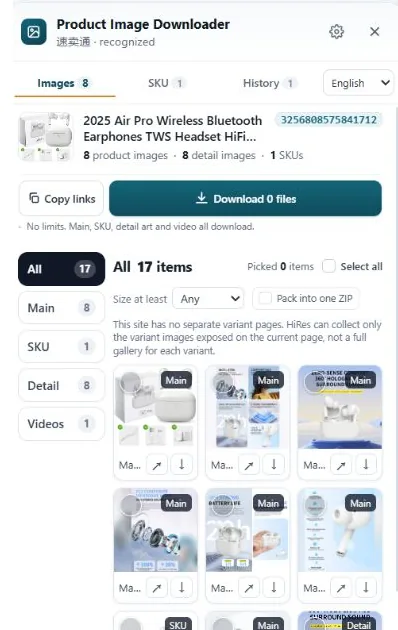
Walmart serves product photos in several sizes and puts the requested size right in the image URL. Raise the height and width values in that URL and you get the big file. Variant photos need each option clicked first so its set loads. A downloader panel collects the gallery, variants and detail images in one pass if you are doing more than a listing or two.
Why the file you saved is smaller than the photo you saw
Walmart's pages are built for speed. The gallery loads a mid-size copy of each photo, usually a few hundred pixels wide, because that is all the layout needs. When you right-click and save, the browser stores the copy it already downloaded, not the original sitting on the server.
Open that saved image in a new tab and read the end of its URL. Walmart image addresses (they live on i5.walmartimages.com) typically carry sizing values like odnHeight=768&odnWidth=768. Those numbers are instructions to the image server: make me a copy this tall and this wide. Change the instruction and the server hands back a different copy of the same photo.
Method 1: raise the size values in the image URL
For a single photo, this takes about twenty seconds:
- On the product page, click the gallery image to open the larger preview or zoom view.
- Right-click the image and open it in a new tab.
- Find the sizing values in the URL, the part that looks like
odnHeight=768&odnWidth=768. - Change both numbers to 2000. Keep them equal for a square photo, and leave the rest of the URL, including the background value, exactly as it is.
- Reload the tab. If the photo comes back bigger, save it. If it comes back the same size as before, 2000 is more than the seller uploaded and the server gave you everything it has.
That last point matters. Walmart hosts plenty of third-party marketplace listings, and plenty of those sellers uploaded modest originals. A national brand's blender might exist at 2000px. An unbranded phone case might top out at 900. The URL edit retrieves the largest copy on file; it cannot add detail that was never uploaded.
Method 2: click through the variants, because the gallery hides them
The default gallery is only the default option's story. On listings with colors, sizes or styles, each option carries its own photo set, and the photos for the option you have not selected are not sitting in the page waiting to be saved. They load when you pick the option.
So the manual routine is: select an option, wait for the gallery to swap, save its photos at full size using the URL method above, then move to the next option and repeat. A listing with four colors and seven angles per color is 28 files and a lot of tab juggling. Miss one option and your research folder has a hole in it that you will notice weeks later, mid-listing, when it is least convenient.
Scroll down as well. Some Walmart listings place extra product shots and infographic-style images in the description area below the fold. Those are separate files from the gallery, at whatever size that seller uploaded, and they are the first thing a quick gallery-only pass leaves behind.
Doing it with HiRes instead
HiRes is a Chrome extension that works on the Walmart product page you already have open. Click the floating button and the panel lists what the page exposes: the main gallery in one group, variant images with their option labels in another, and detail images in a third. You can save files one at a time for free, with no daily cap and no account, or pack a larger selection into a ZIP on Pro ($19 once, no subscription).
The honest limits. HiRes reads the page in front of you, so a variant you never selected may not have loaded its photos yet; open the panel after picking an option if that set matters. And like the URL method, it returns the largest copy Walmart serves for that photo. If the seller uploaded a small original, small is what exists. Everything runs locally in your browser, and the files go straight from Walmart's servers to your Downloads folder.
Whose photos are these? Research copies are normal seller work. Republishing is different. Walmart gallery photos belong to the brand or marketplace seller behind the listing, and lifting them into your own live listing without permission can get it removed. Our guide on using supplier photos covers where the line sits.
Questions people ask
What size are Walmart product images?
It depends on the seller. Walmart's image servers hold several sizes of each photo and serve the one the page asks for. Big brands often have 2000px originals on file, while plenty of marketplace listings top out nearer 1000px. The version you reach through the zoom view, or by raising the size values in the image URL, is normally the largest one available.
Why does the image I saved from Walmart look so small?
The gallery displays a mid-size copy so the page loads fast, and right-click saves that copy. The larger version sits at the same address with different size values in the URL. Open the image in a new tab and raise the height and width values, or open the zoom viewer first, and you will get the bigger file.
Do Walmart variant images download the same way?
Yes, but you have to select each option first. Clicking a color or size option swaps the gallery to that variant's own photos, and only the set on screen is there to save. Work through the options one at a time, or open the HiRes panel to see each variant's images as their own labeled group.
Can I use Walmart product photos in my own listings?
The photos belong to the brand or marketplace seller who uploaded them. Saving them for research, spec checks and comparison is standard practice, but publishing them in your own live listing without permission risks a takedown. For anything shoppers will see, get permission or use your own photos.
Skip the URL editing
HiRes gathers the gallery, variant and detail images from the Walmart page you are already on, in one panel. Free for individual downloads, no account needed.
Get HiRes for Chrome